|
Firewall Overview
Secure and test your connection
|
 |
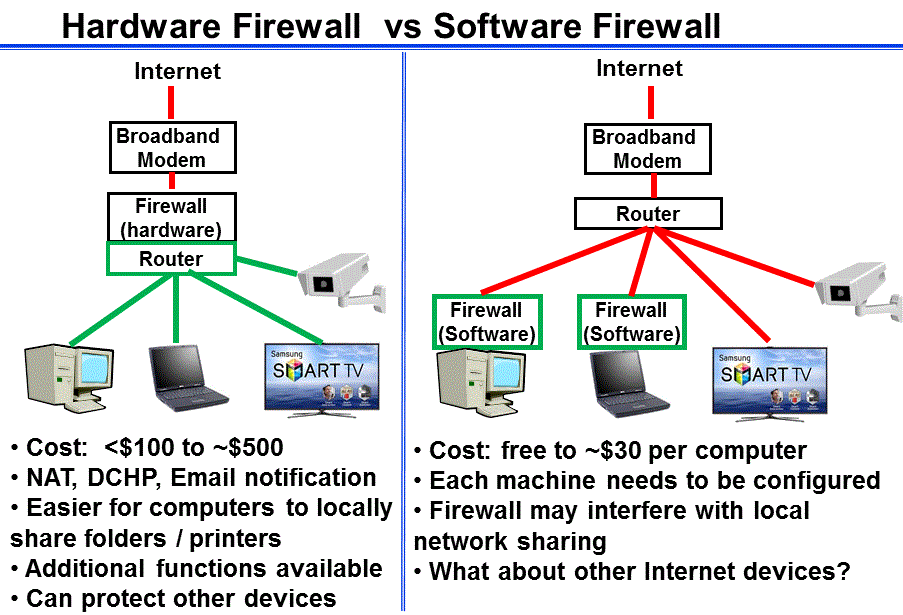
- A firewall should monitor incoming and outgoing traffic
- Some firewalls are more secure than others (stateful packet inspection,
ICSA Certified, etc)
- Most firewalls do not protect against viruses
- All firewalls require administration (set-up configuration, updates,
granting permission for applications)
- Some firewalls have the option of being modified only after an administrative
password is entered. This might be useful if you want to limit what other
users (kids) can do with your firewall.
- Change the default administrative password included in a purchased firewall
- Event logs – how do you want to handle these?
- You can traceroute IP#’s and search for info on Port Numbers
For more information -
To help read the logs / alerts from firewalls
- dshield
- integrates the logs of many firewalls.
- speedguide.net has a huge
port database that you can browse or search.
-
Port Numbers
- Official list from IANA
- You can also search for "port xxx" using Google
Testing Your Current Security
- Belarc advisor - Try the free
download and generate a detailed report about your windows environment, and
shows a list of other devices on your local network.
-
Netstat - This DOS command will show you what ports are currently active
in your own computer.
- nmap.org - a free tool you can install to
scan specific devices on your local network - Tells you what ports are
"open" on each local device
- Online port scan: Shields up
- Comprehensive tests:,
Security Space Audit
,
- Wireshark
- Power users may want to try this free network analyzer which lets you
examine packet level data from a live network connection.
Contact me at 703-729-1757 or Russ
'at' navigators.com
If you use email, put "internet training" in the subject of the
email.
Copyright © Information Navigators